Software for small assisted living homes
Run your home. Not your paperwork.
Medication charting, daily care documentation, compliance dates, and owner oversight in one system built for small Arizona assisted living homes. Digital where your team is ready. Paper where it still works.
Built inside four Arizona assisted living homes and used by their caregivers every shift.
A 31-second introduction with narration. Or go straight to booking a demo →
 Shift Hub
Guided tours
See Tendera from your side of the home.
Choose your role and walk through a few everyday tasks.

One shift, start to handoff. Demo walkthrough · Fictional data
Shift Hub
 Med Pass
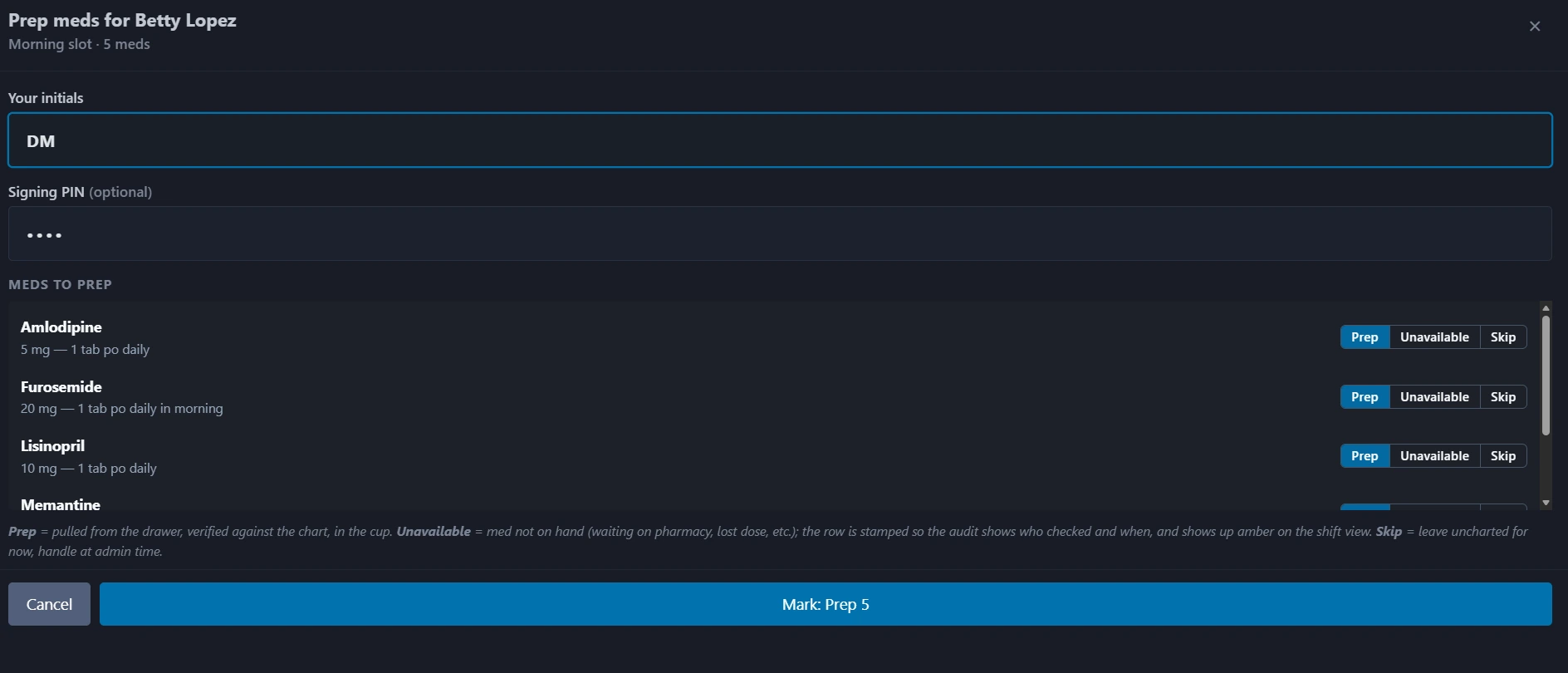 Med Pass · Prep
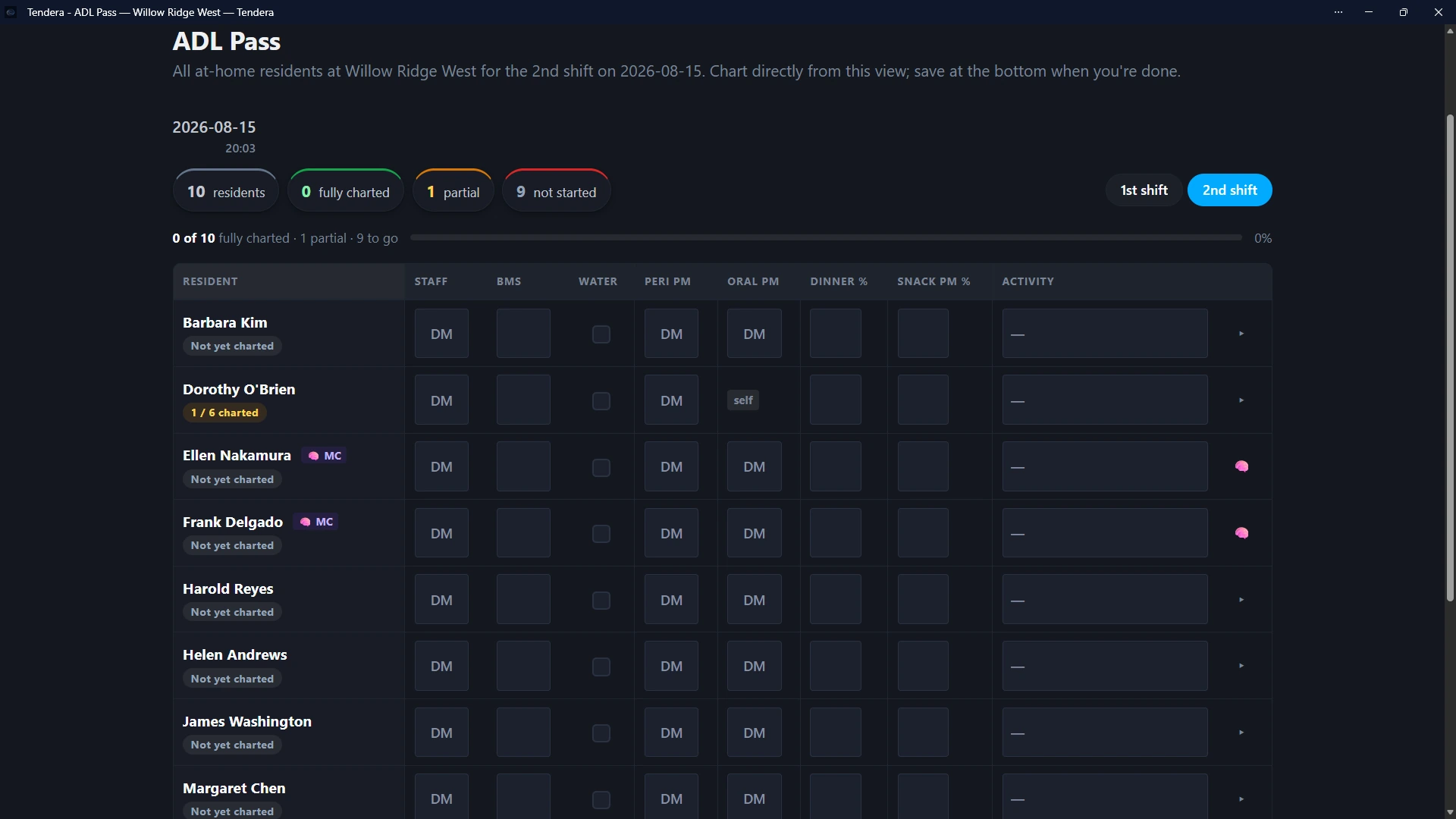 ADL Pass
Shift Hub · Handoff
ADL Pass
Shift Hub · Handoff
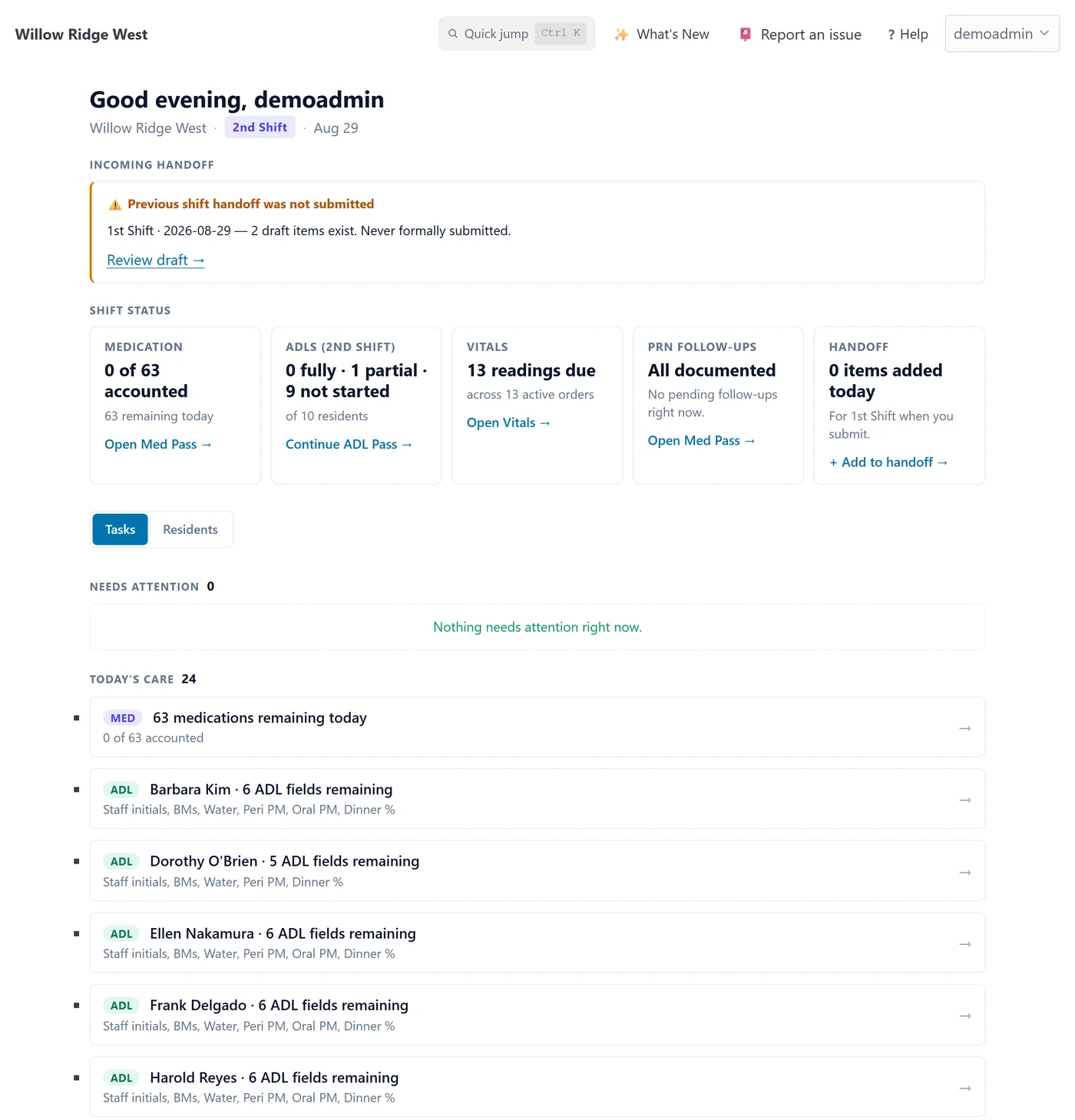
Step 1 of 5 · Start the shift
Open Shift Hub.
The caregiver signs in and lands here. Medications, ADLs, vitals, PRN follow-ups, and the handoff each get a card with what is left for this shift.
What you are seeing: the previous shift left draft handoff items but never submitted them. Tendera says so instead of pretending the handoff was clean.
Step 2 of 5 · Open a care workflow
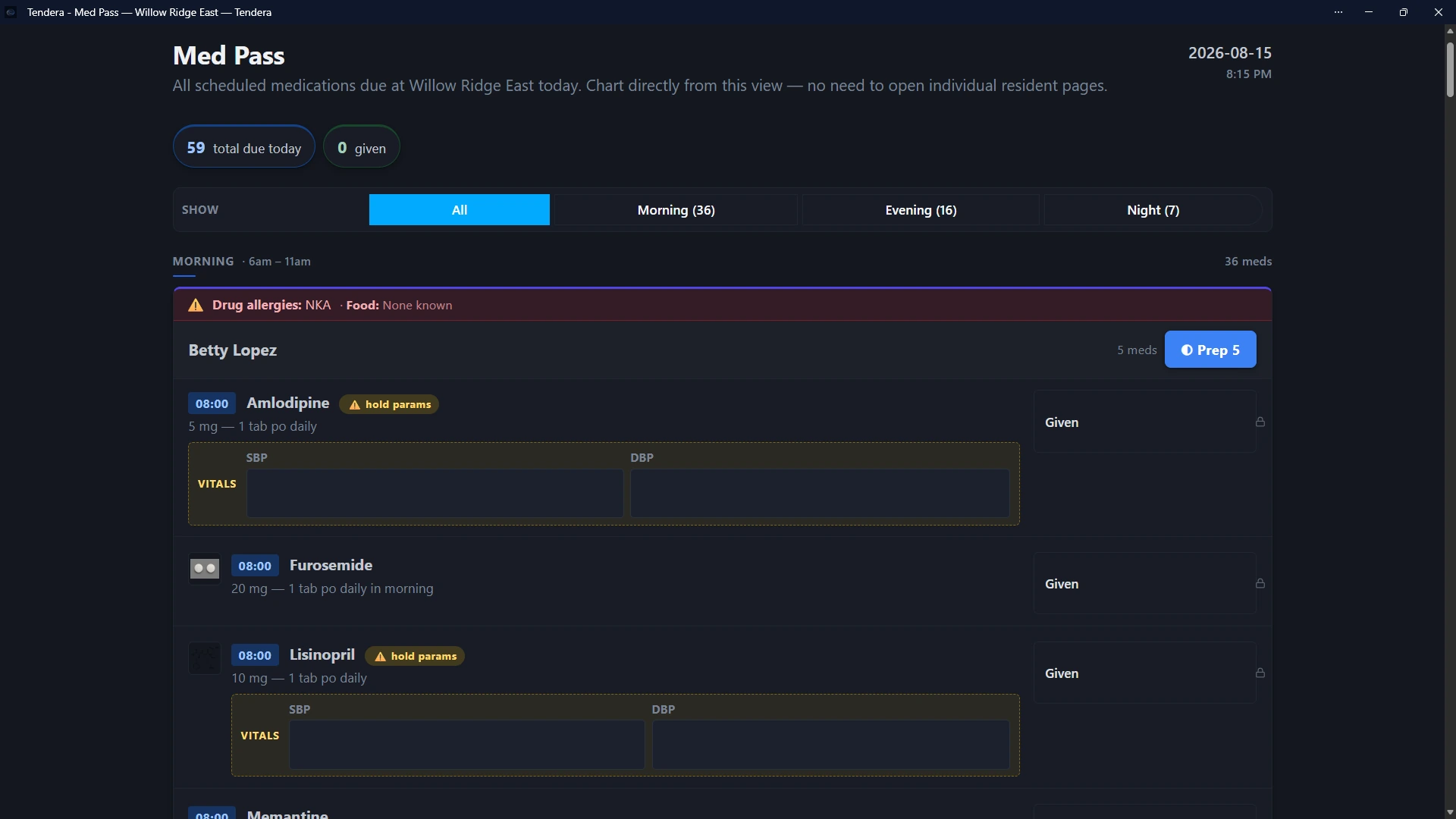
Open Med Pass.
Medications are grouped by resident and time slot. Allergies sit at the top of each resident's block. Medications with hold parameters ask for the vitals first.
What you are seeing: the morning slot for one resident. Two blood pressure medications show hold parameters, so the vitals fields appear inline before anything can be recorded.
Step 3 of 5 · Prep before give
Prep the slot.
Before a medication can be charted as given, the caregiver records that it was pulled, checked against the chart, and prepared. Each medication is marked Prep, Unavailable, or Skip, with initials and an optional signing PIN.
What you are seeing: the prep dialog for that resident's morning slot. Unavailable stamps the record so the audit shows who checked and when.
Step 4 of 5 · Daily care
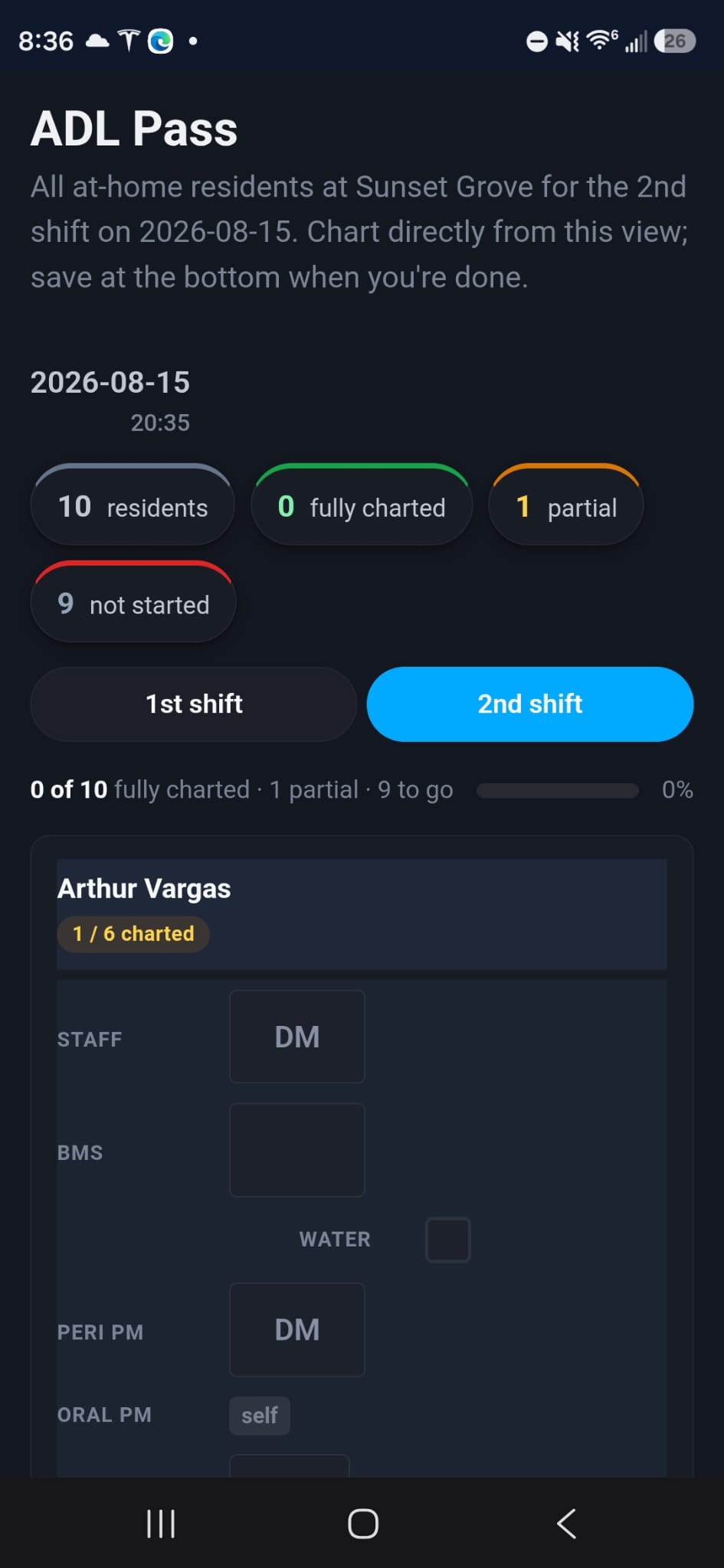
Chart ADLs from one grid.
Every resident on the shift is a row. Staff initials, meals, fluids, personal care, and activity are columns. Residents who handle something themselves are marked that way instead of leaving a blank.
What you are seeing: the second-shift ADL grid for one home. The same grid runs on a phone with one resident per card.
Step 5 of 5 · Prepare the handoff
Hand off the shift.
During the shift the caregiver adds items to the handoff: held medications, pending PRN follow-ups, anything the next person should know. Submitting it, even with nothing to report, is a positive record.
What you are seeing: the Handoff card on Shift Hub. The next caregiver reads the submitted handoff at the top of their own Shift Hub, which is where this tour began.
Know what needs attention, then get to the record. Demo walkthrough · Fictional data
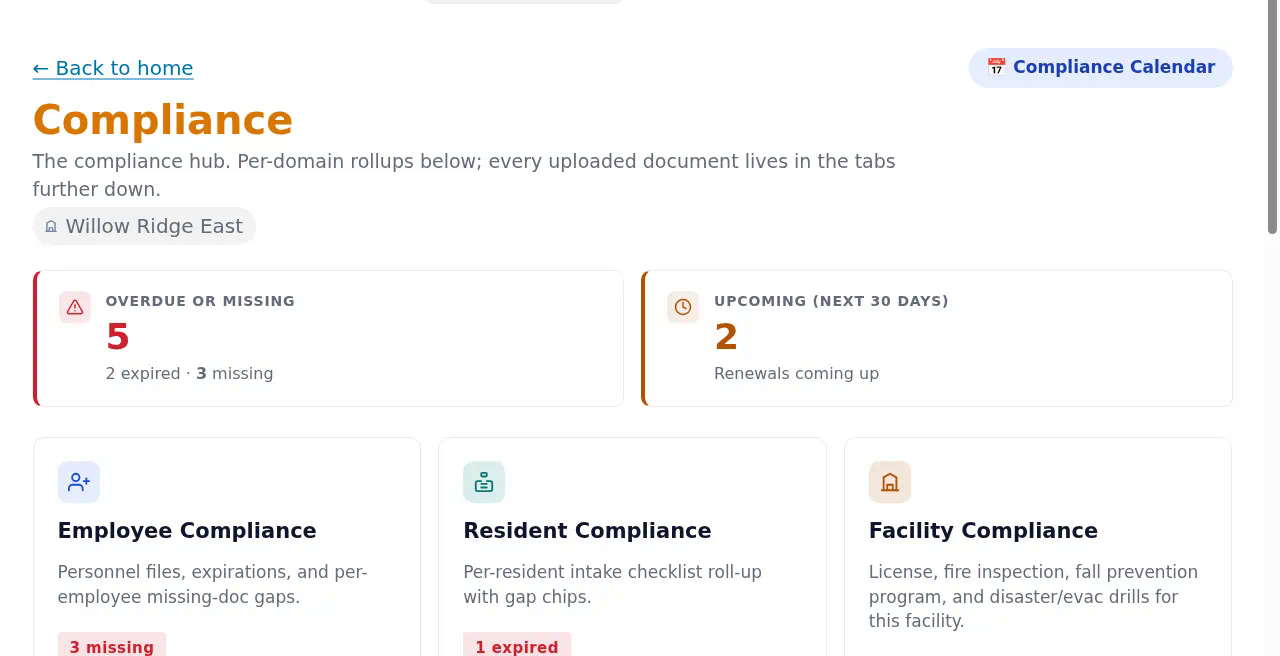
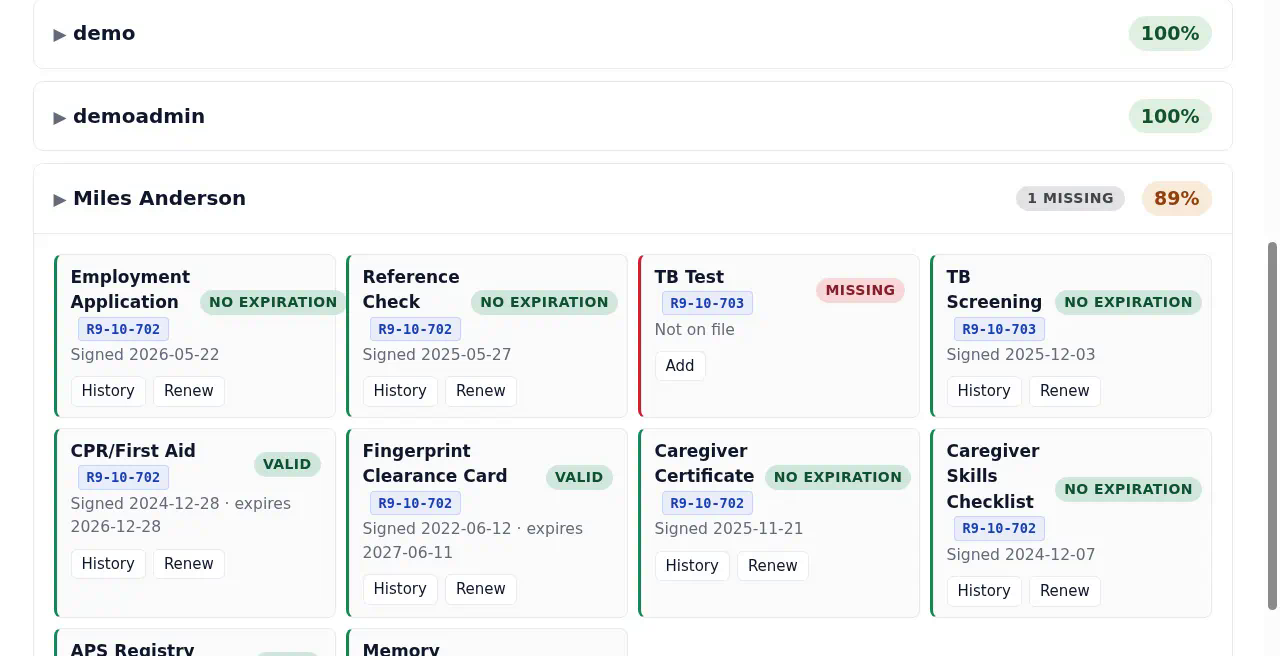
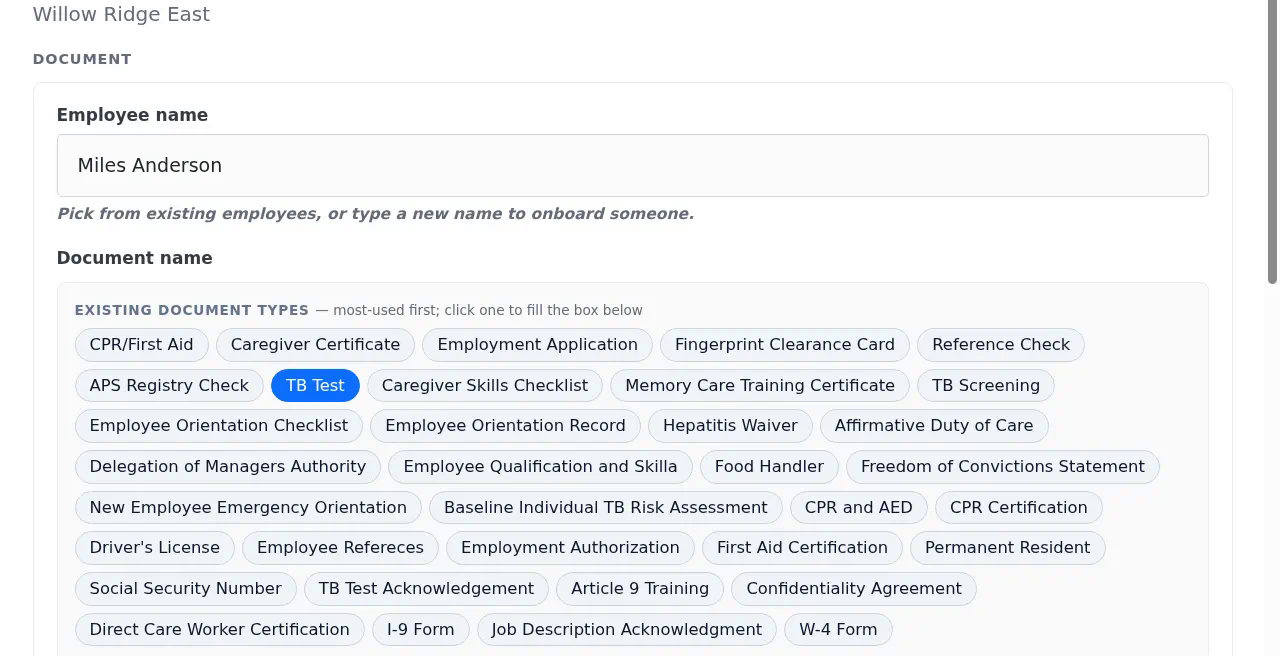
Step 1 of 3
Spot what needs attention
See missing, expired, and upcoming documentation across your home.
Step 2 of 3
Find the specific gap
Expand an employee's checklist to see what's on file and what needs attention.
Step 3 of 3
Start adding the record
Open the document form with the employee and document type already selected.
See across your homes. Know where to focus. Demo walkthrough · Fictional data
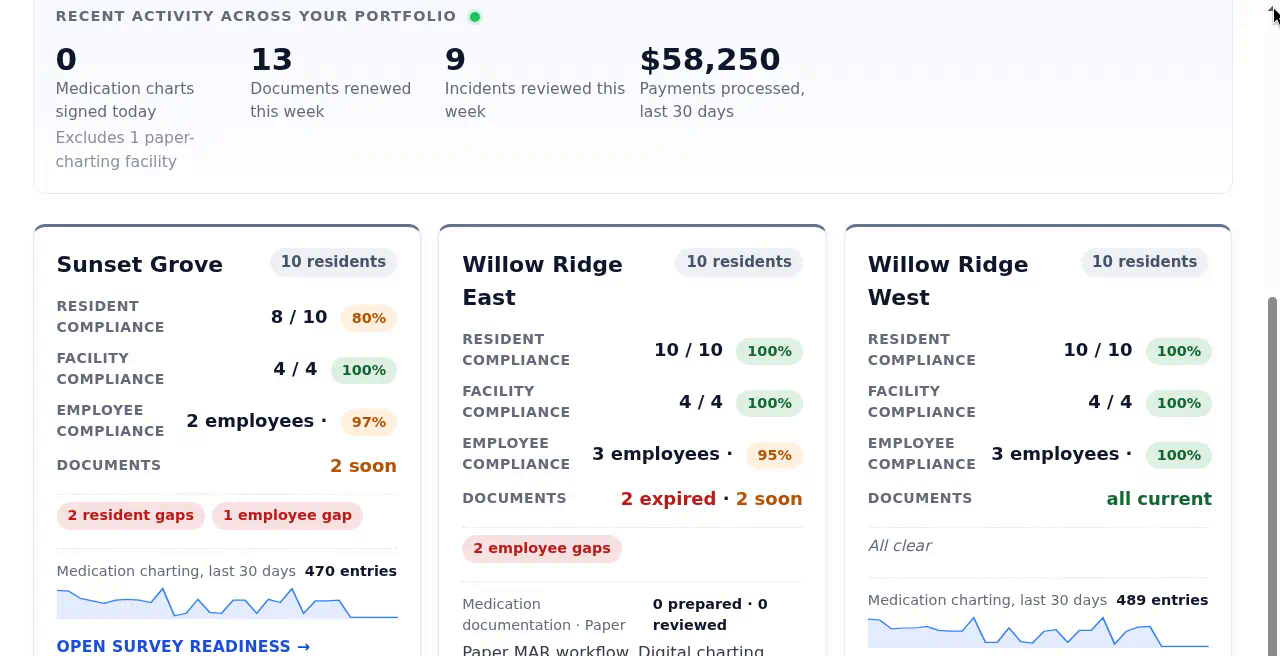
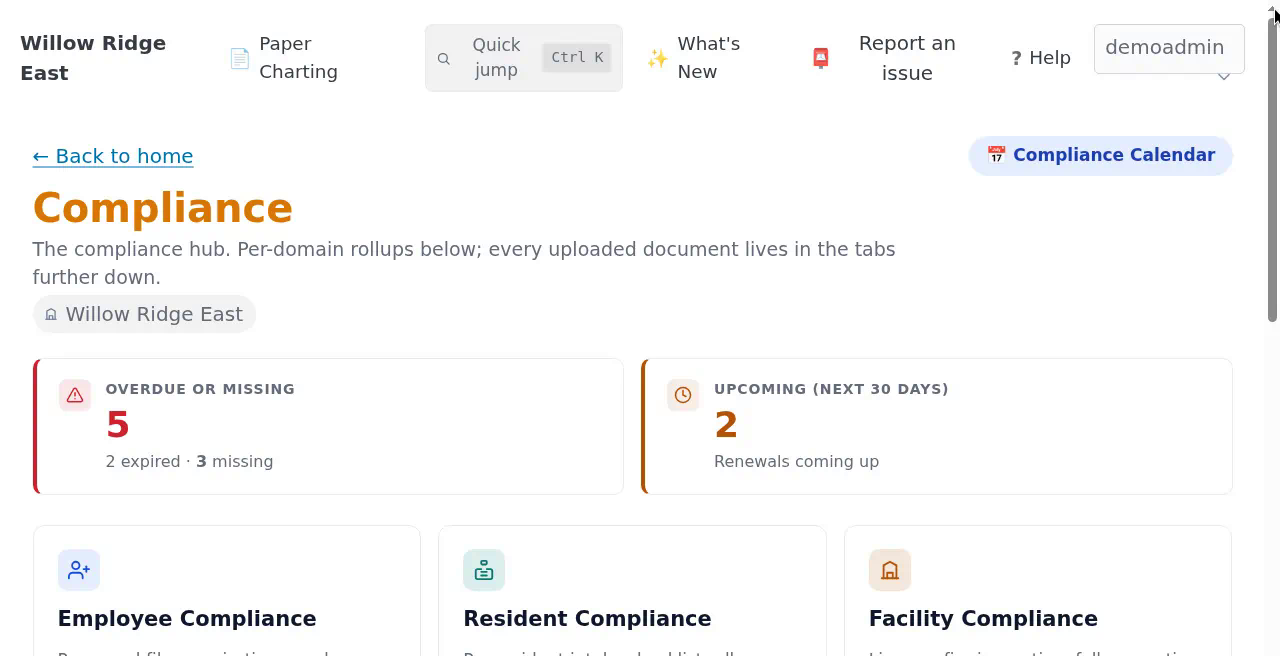
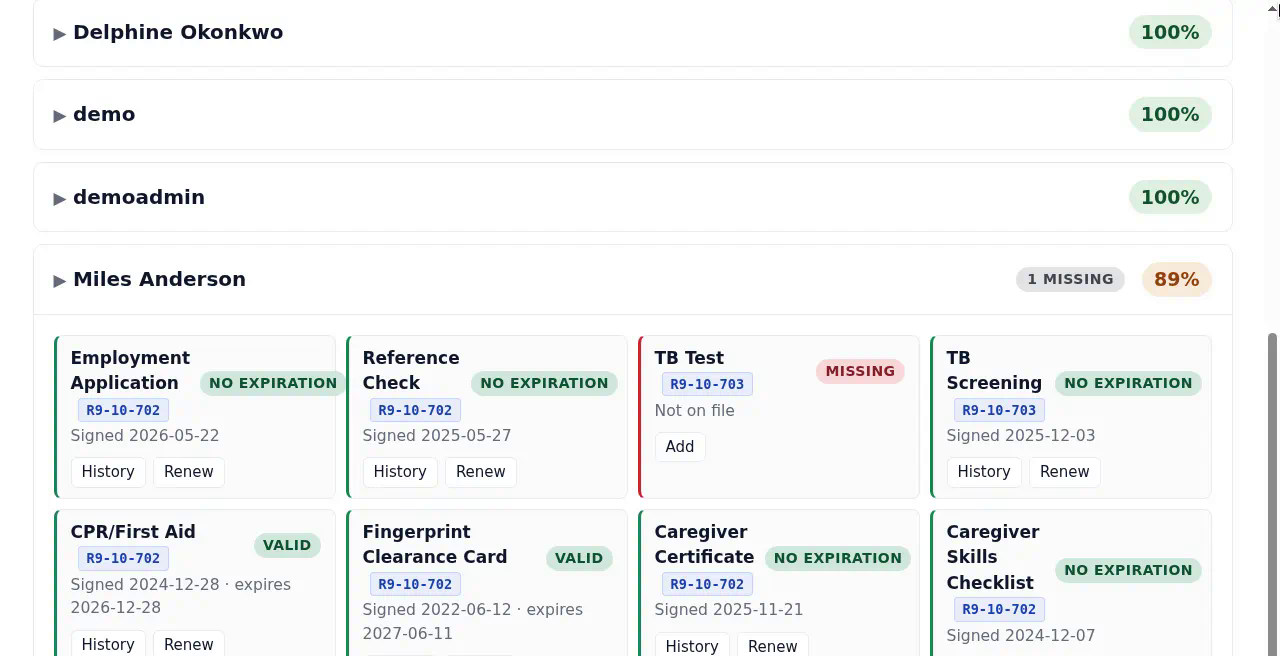
Step 1 of 3
Compare your homes
Compare documentation status and recent activity across your portfolio.
Step 2 of 3
Look into one home
Review a home's missing, expired, and upcoming documentation in its Compliance hub.
Step 3 of 3
See the underlying gap
Inspect an employee's checklist to identify the document that needs attention.
These are selected views from Tendera's demo organization, with fictional residents and staff. Each step shows a point in the workflow rather than one direct click in the application. Use Enlarge to read any screen at full size.
Why Tendera
Built for how a small home actually runs.
Not a hospital system cut down to size. Tendera started inside a working assisted living operation, and it shows in the details.
Paper or digital, one workflow at a time
Medication charting and ADL charting are set per home and switch to digital independently. A home can run a paper MAR with digital ADLs, or the reverse, and change later without losing history.
Medication safeguards that match a real med pass
Prep is recorded before anything is charted as given. Hold parameters ask for vitals first. PRN follow-ups stay visible until they are documented. Every record carries initials and, when set, a signing PIN.
Arizona rules, built in
Resident, employee, and facility compliance follow the ADHS personnel-file and chart baselines. Survey Readiness shows the tracked documentation gaps and outstanding work for each home in one place. Regulatory updates on the dashboard are reviewed by a person and link to the official source.
One system, one login
Residents, assessments, service plans, incidents, vitals, staff schedule, billing, menus and activity calendars, documents, and the owner portfolio. One login for the whole home, whether a workflow is charted digitally or on paper.
Want the detail on each workflow? See the full product overview, the Arizona compliance page, or how resident information is protected.
Paper or digital
Your home does not have to change overnight.
Some teams are ready to chart medications on a phone tomorrow. Others need the paper MAR binder for another year. Tendera supports both, per home, per workflow.
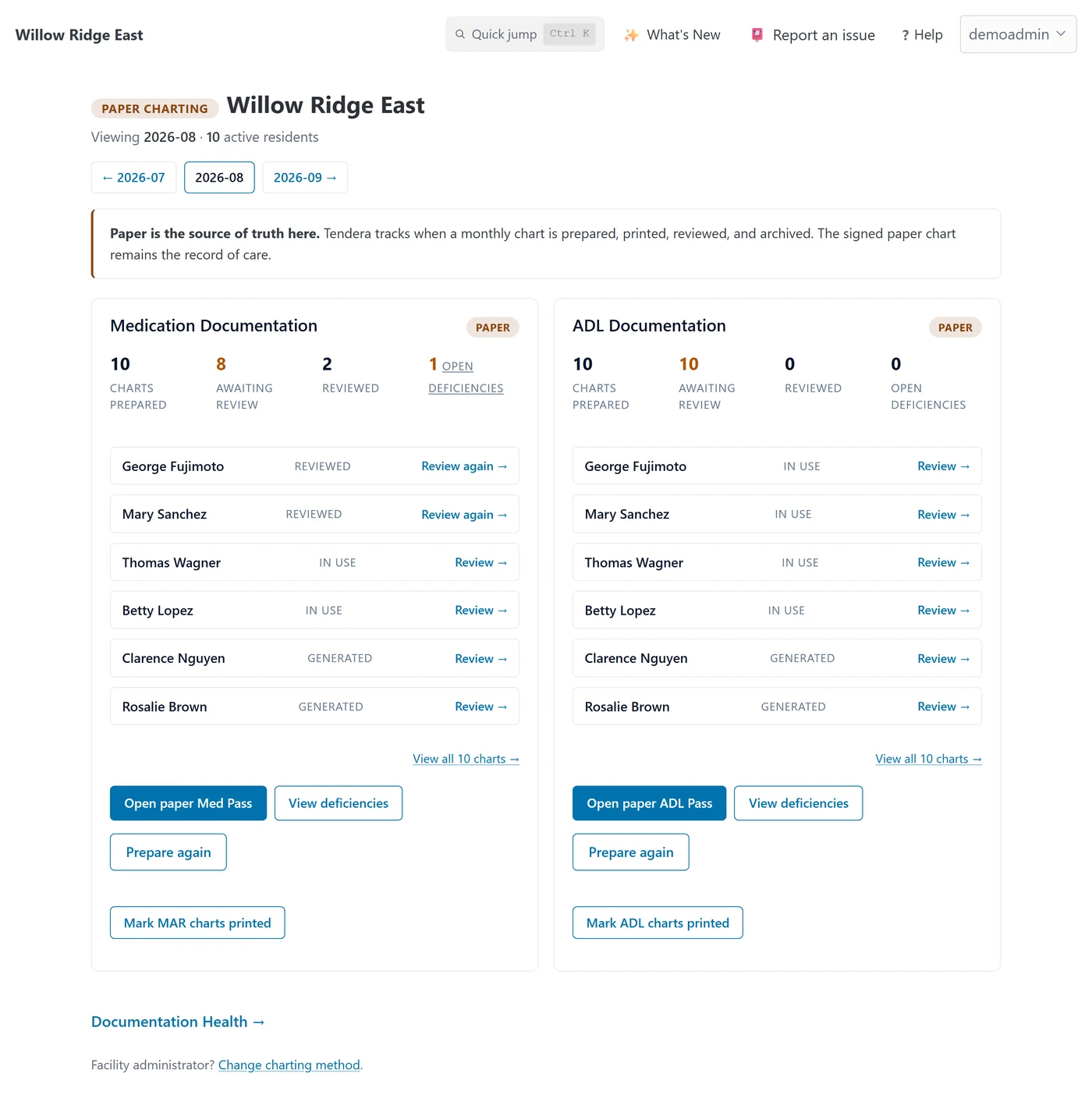
When a workflow stays on paper, the signed paper chart is still the record of care. Tendera prepares the monthly charts per resident, records when a staff member marks them printed, records the manager's review, and turns anything found during review into follow-up work assigned to a specific person.
 Paper Charting
The person you talk to runs assisted living homes too.
Tendera was built by Oscar Soto, who owns and operates four assisted living homes in Arizona. He wrote it for his own caregivers, managers, and state surveyors before opening it to other Arizona operators. It still runs in the homes it was born in, every shift.
When you book a demo, Oscar is the one who replies. No sales team, no hand-off to a colleague, and no feature that did not first earn its place on a real shift.
Oscar Soto · Founder, Tendera · Read the full story
Pricing
One plan. Everything included.
Get the complete Tendera platform, with personal help getting your home and team started.
$200 per facility, per month
Every feature included
Care documentation, medication workflows, compliance tracking, daily operations, and owner oversight. No feature tiers or paid add-ons.
$0 implementation fee
No separate implementation charge to get started with Tendera.
Complimentary personal onboarding and training
Work directly with us to set up your home, learn the workflows, and help your team get comfortable.
Move at your team's pace
Start with the workflows your home needs today. Keep paper charting where it works and introduce digital charting when your team is ready.
Book a demo
See what running your home with Tendera feels like.
Twenty minutes, owner to owner. See the product, ask questions, decide whether it fits.
$200 per facility, per month No add-ons $0 implementation Personal onboarding included
Prefer email? Write to hello@tendera.care and say which workflows you want to see.