Product
How a Tendera home runs.
Five connected workflows, each shown on a real screen from the demo organization: what the job is, what you see, and what you end up with. The guided tour on the homepage walks one shift; this page explains the whole operation.
01Caregiver
Shift Hub is where the shift starts. The workflows are where the work happens.
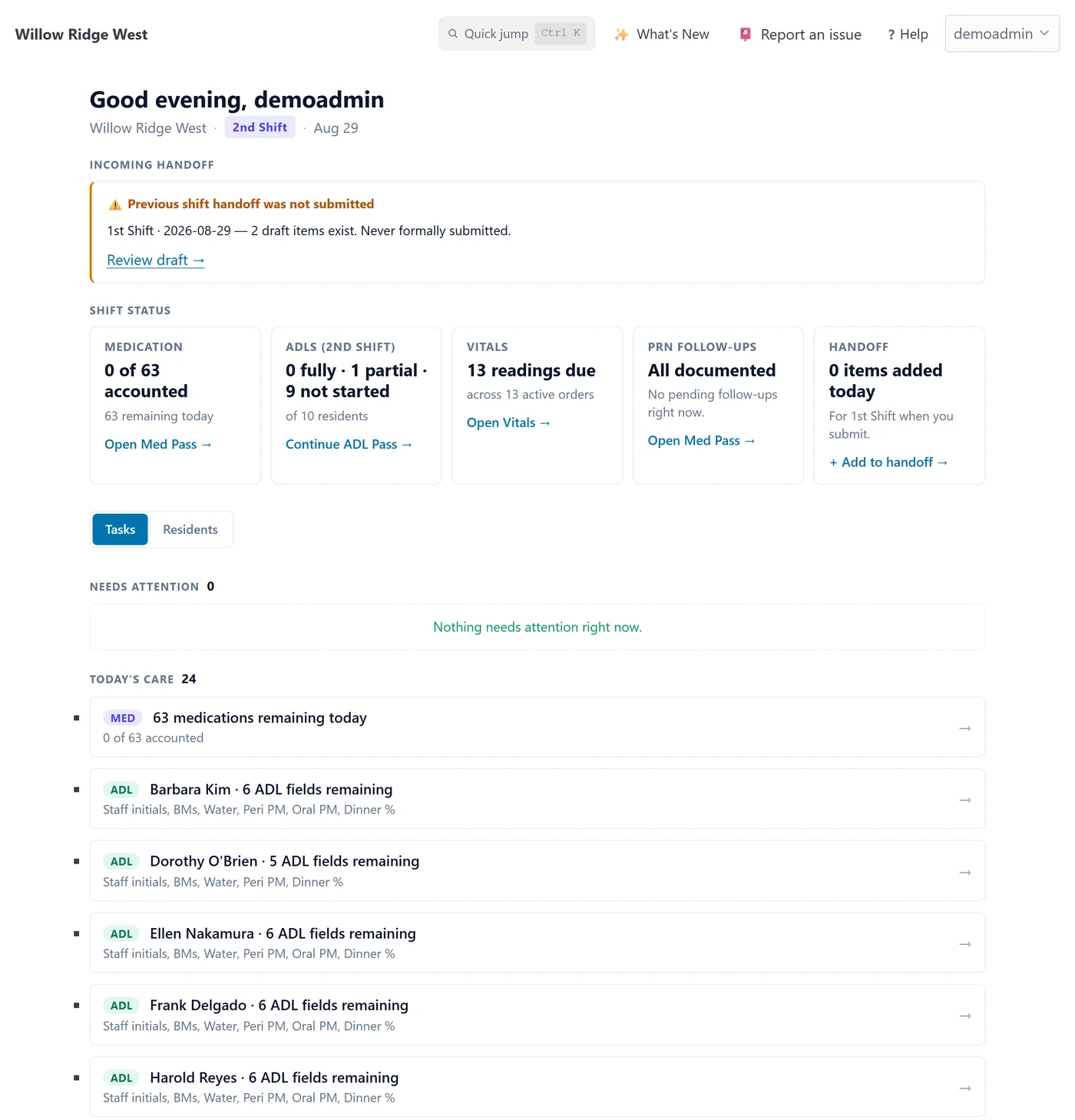
A caregiver signs in and lands on Shift Hub: what is due, what still needs attention, and whether the last shift left a handoff. Every card links into the workflow that owns it.
 Shift Hub
Shift Hub
One page per shift, on a 6am and 6pm boundary. Medications accounted for, ADLs charted, vitals due, PRN follow-ups pending, and the handoff, each with a link to the screen that does the work. A Needs Attention list holds held or refused medications and other exceptions; Today's Care holds routine work still to do, grouped by task or by resident.
What you end up with: a caregiver who knows what the shift needs without checking six screens, and a manager who can see the same numbers.
 Med Pass
Med Pass
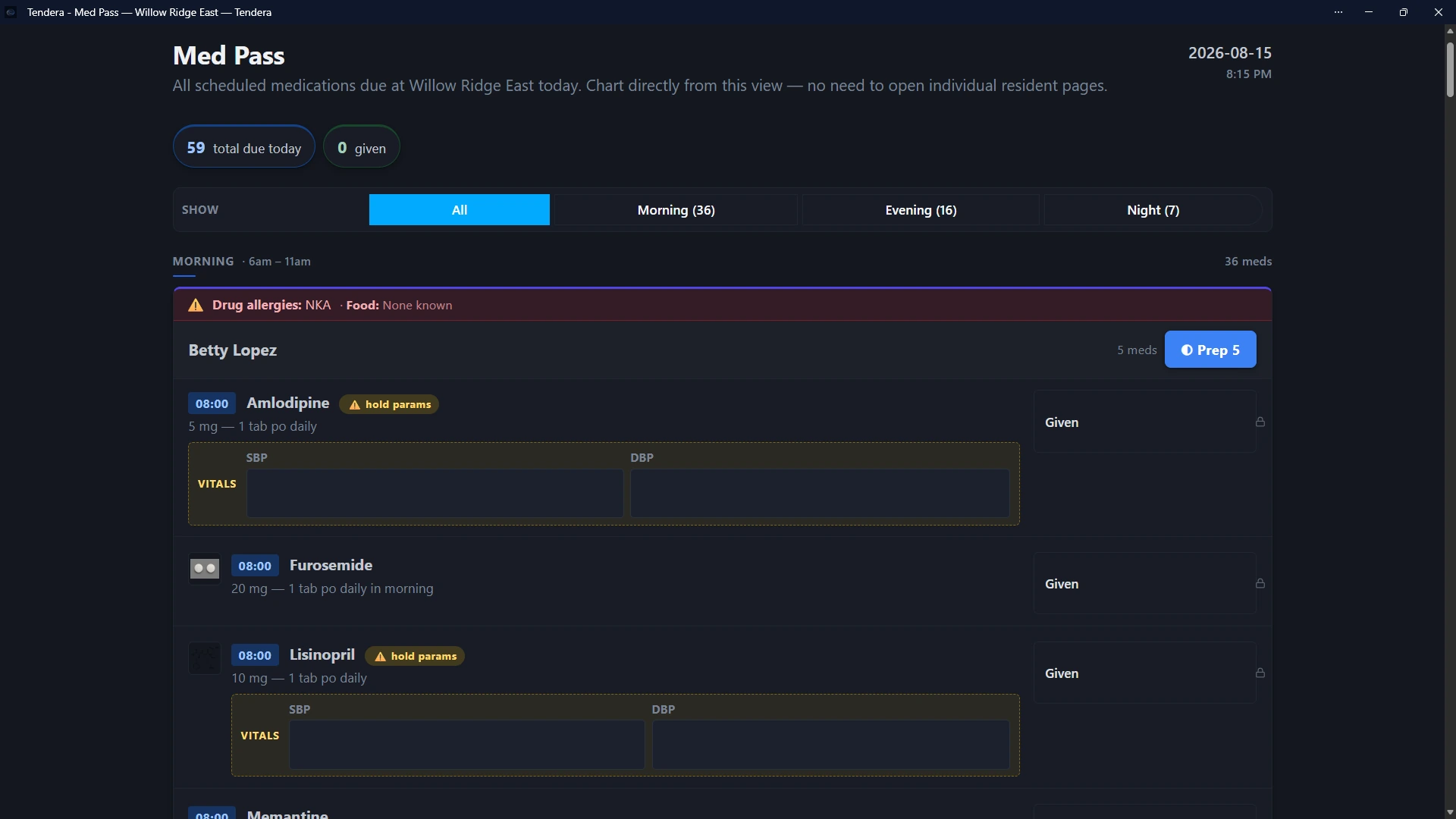
Every scheduled medication for the shift, grouped by resident and time slot, with allergies at the top of each resident's block. Medications with hold parameters ask for the vitals first and are held automatically when a reading is below the physician's threshold. PRN and controlled medications have their own structured dialogs, and a PRN stays on the follow-up list until its effect is documented.
Prep is a documented step: before a dose can be charted as given, the caregiver records each medication in the slot as prepared, unavailable, or skipped (with a note), with their initials. It records what the caregiver reported at the time; it does not prove what happened at the cart. Refused and held doses carry a structured reason.
Each save carries initials, and a personal signing PIN when the home requires one or the staff member has set one. A month-view MAR prints for a surveyor, a physician, or a paper chart.
What you end up with: a medication record that shows who prepared, gave, held, or refused each dose and why, with the vitals attached where they mattered.
See medication workflows in Tendera
A short look at Med Pass, a resident's daily medication chart, and a printable monthly MAR. Twenty-four seconds, no sound, demo data.
- Med Pass. Scheduled medications for a resident's morning slot, with the vitals fields that hold parameters ask for.
- Daily medication chart. One resident's eMAR for the day, each dose with its status.
- Printable monthly MAR. The month-view record as it prints for a surveyor, physician, or paper chart.
Three separate views from the demo organization, with fictional residents. Not a live application.
 ADL Pass
ADL Pass
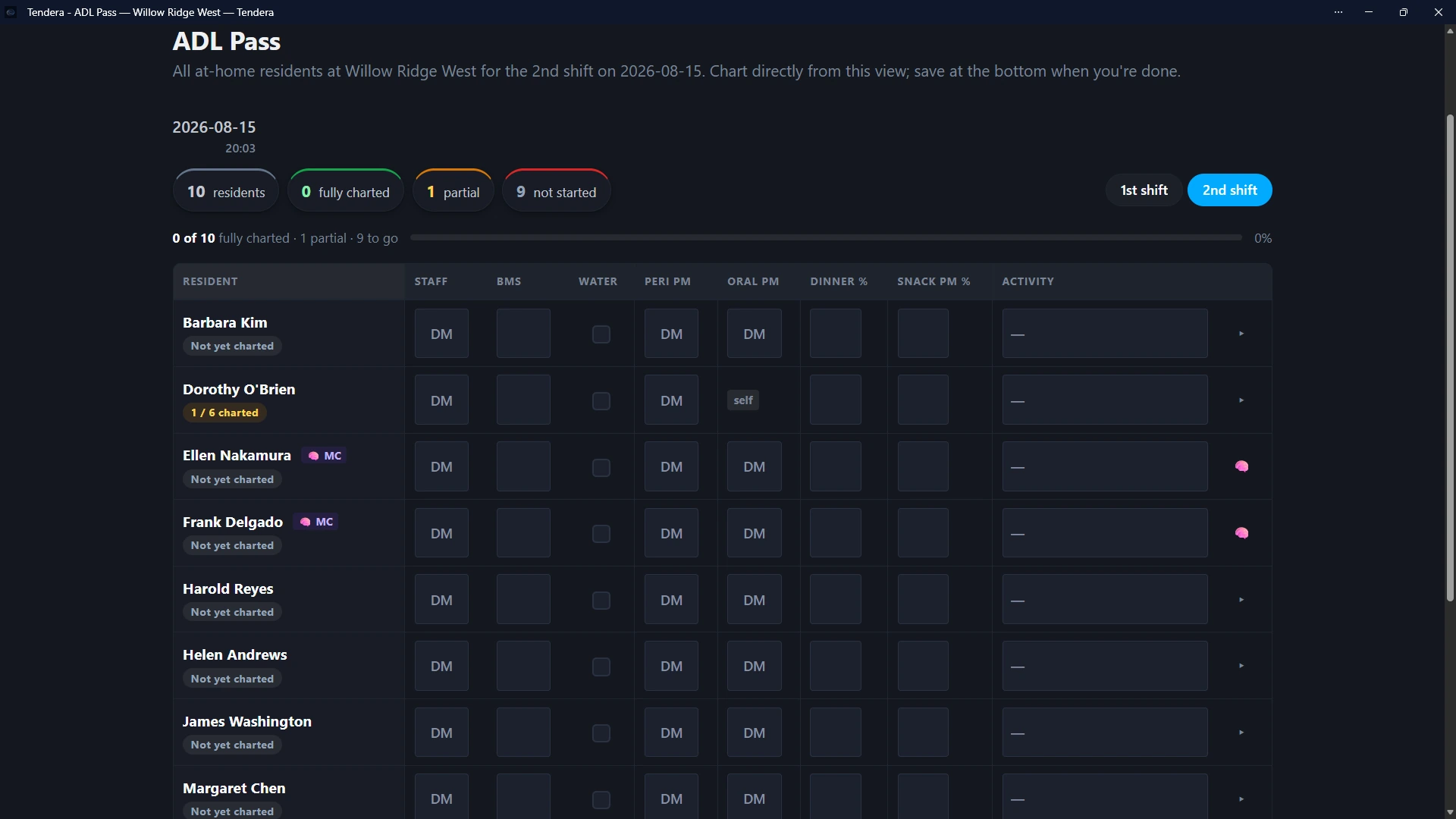
Every resident on the shift is a row; the day's care items are columns. Chart from a desktop grid or one resident at a time on a phone. Items a resident handles independently are marked that way instead of sitting as a blank, and the shift's progress (fully charted, partial, not started) is visible at the top.
What you end up with: daily care documented during the shift rather than reconstructed at the end of it, and a month-view ADL record to print.
Vitals
Blood pressure, pulse, temperature, weight, glucose, and oxygen saturation in one form. Scheduled vital orders put readings on the due list, trends show over time, and the same readings feed Med Pass hold parameters.
Readings print per resident when a physician or surveyor asks.
Shift handoff
During the shift the caregiver adds handoff items: held medications, pending PRN follow-ups, anything the next person should know. At the end they submit it, or submit it clear. The next caregiver sees the handoff at the top of their Shift Hub, and sees plainly when the previous shift never submitted one.
Submitted, submitted clear, and not submitted are three different states on purpose.
02Manager
Resident records, documents, and deadlines, organized the way a surveyor asks for them.
A manager's day is the resident chart and the compliance file. Tendera keeps both current and shows what is overdue or coming due before anyone has to open every folder.
 Compliance hub
Compliance hub
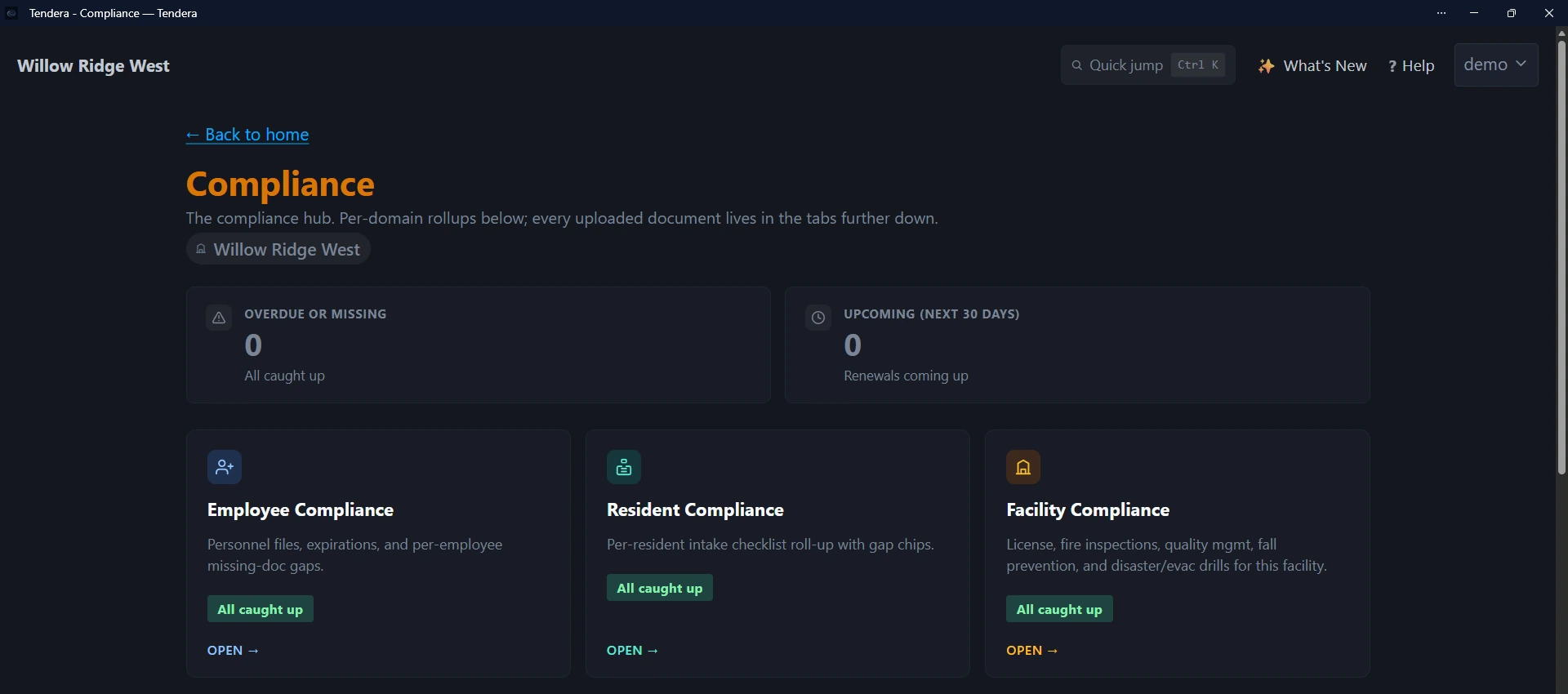
Opens on two numbers: what is overdue or missing, and what comes due in the next 30 days. Below them, three domains: resident charts, employee personnel files, and facility documents, each with its own roll-up and gap list. Every item is a document you can open, renew, or replace, with the history kept.
What you end up with: one place that answers "what is overdue right now?" for the whole home.
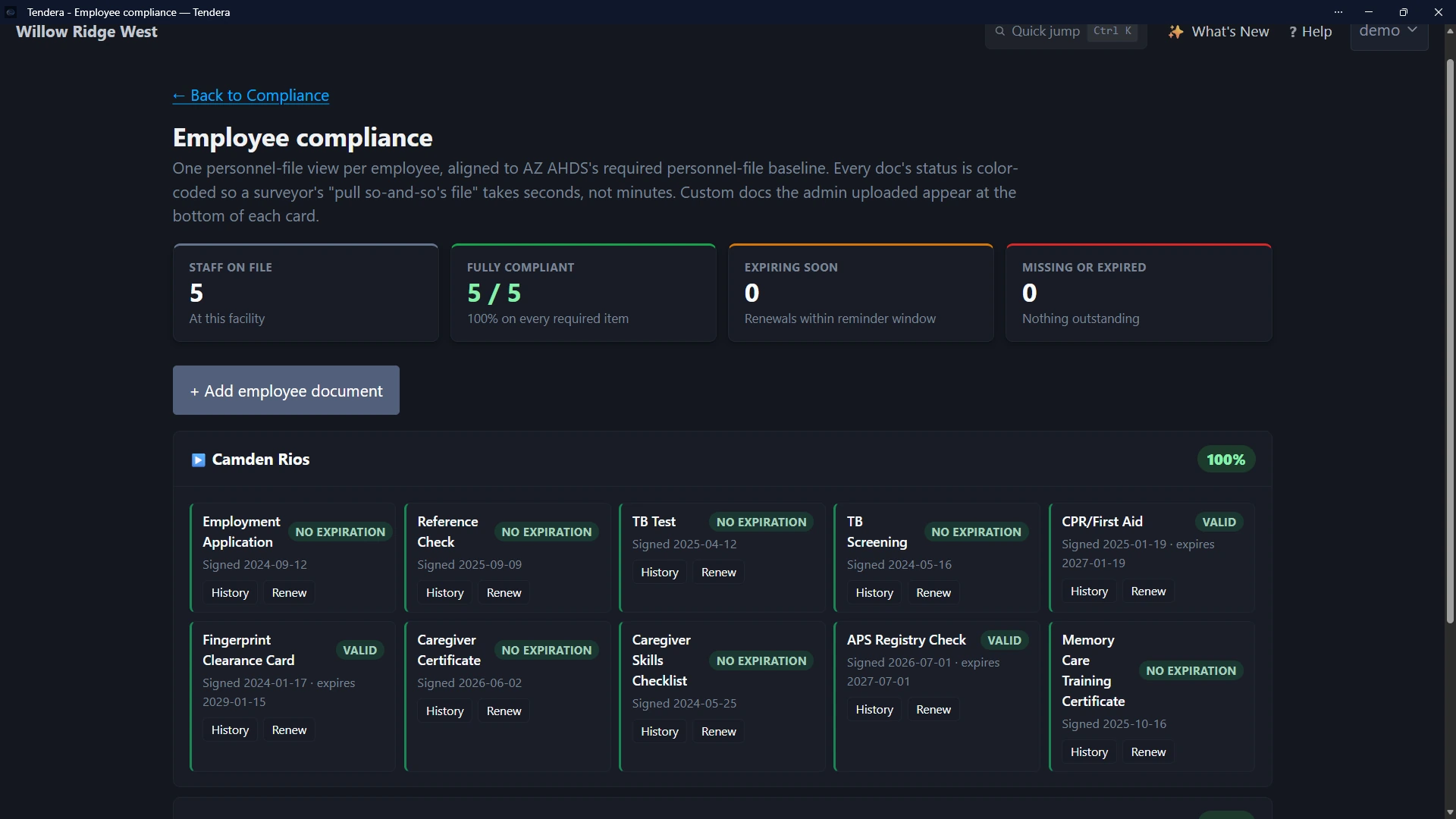 Employee compliance
Staff credentials
One personnel-file view per employee, built around the items an Arizona personnel file is expected to hold: employment application, reference check, TB test and screening, CPR and first aid, fingerprint clearance card, caregiver certificate and skills checklist, APS registry check, and memory care training. Add your own document types alongside them. Each item shows its signed date and expiration, and renewals keep the prior version on file.
What you end up with: a surveyor's "pull this caregiver's file" answered from one screen, and expiring credentials visible before they lapse.
Resident records
One record per resident: photo, allergies, diagnoses, physician, pharmacy, emergency contacts, code status, level of care, and medications. An intake checklist tracks the move-in items (HIPAA authorization, resident agreement, directives, DNR status, physician, allergies, and more) and ticks itself when the matching document is uploaded. The face sheet prints in one click.
Assessments
Four structured assessments: Morse Fall Scale, PHQ-9 depression screen, Braden Scale for pressure injury risk, and Mini-Cog cognitive screen. Each is scored as you go, sets its next due date from the resident's risk band, and keeps its history. A high-risk result suggests a service plan review.
Service plans
Each resident's plan carries their level of care, and the next review date follows Arizona's interval for that level (every 12 months for supervisory care, 6 for personal care, 3 for directed care). Plans are versioned: a scheduled review, a significant change, or a level-of-care change opens a new draft, participants and signatures are recorded, and the previous version is kept.
Facility documents and drills
The facility license, fire inspection, and fall prevention program are tracked with expiration dates, and disaster and evacuation drills are logged in the app with date, type, participants, and outcome, or uploaded from paper. Other facility documents can be tracked alongside them.
Incidents
A structured incident form: what happened, vitals, injuries, medical response, contributing factors, prevention action, whether it is reportable, attachments, and a signature. Tendera attaches the medications given in the 24 hours before the event and flags repeat patterns. Notifications to physician, family, or others are recorded on a timeline, and the report prints. A high-severity incident can send an email alert to an address the home configures.
Compliance Calendar
Every tracked expiration on one calendar inside Tendera, colored by home, including resident intake documents. Managers and owners can also subscribe a read-only feed into Google, Outlook, or Apple Calendar. The feed carries facility documents and staff credentials only; resident-linked items never leave Tendera, and renewals still happen in the Compliance hub. Calendar apps refresh subscriptions on their own schedule.
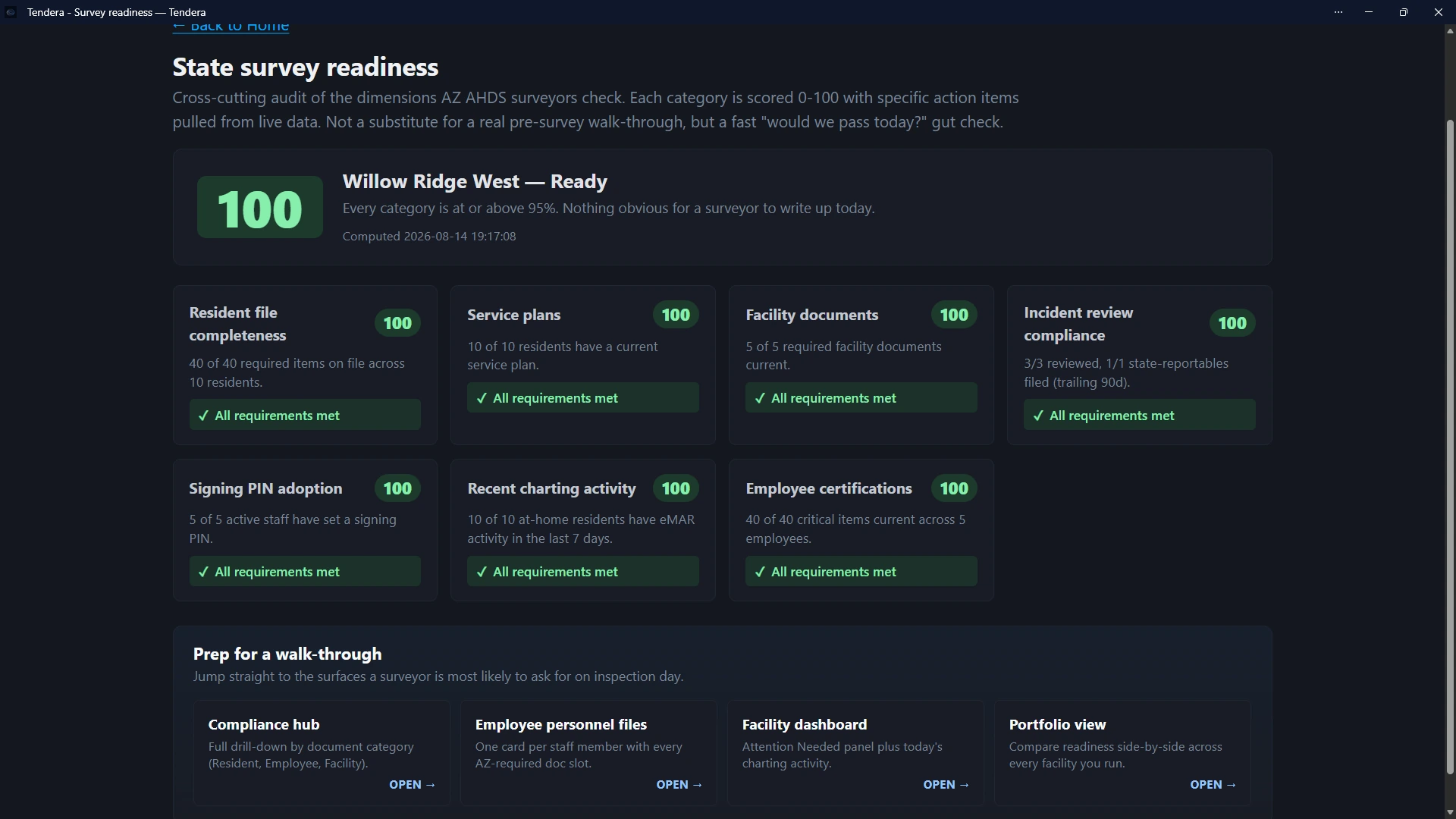 Survey Readiness
Survey Readiness
One page that pulls the tracked categories together: resident file completeness, service plans, facility documents, incident review, employee certifications, charting activity, and signing PIN adoption. Each category shows a completion figure from live data and the specific items to close, with links to the screens a surveyor is most likely to ask for.
What it is, and is not: visibility into the documentation gaps and outstanding work Tendera tracks. It is not a prediction of how a state survey will go, and it does not replace a walk-through.
03Paper charting
When a chart stays on paper, Tendera runs the workflow around it.
Medication charting and ADL charting are set to paper or digital separately, per home. On paper, the signed chart is still the record of care. Tendera keeps the work around it from living in someone's memory.
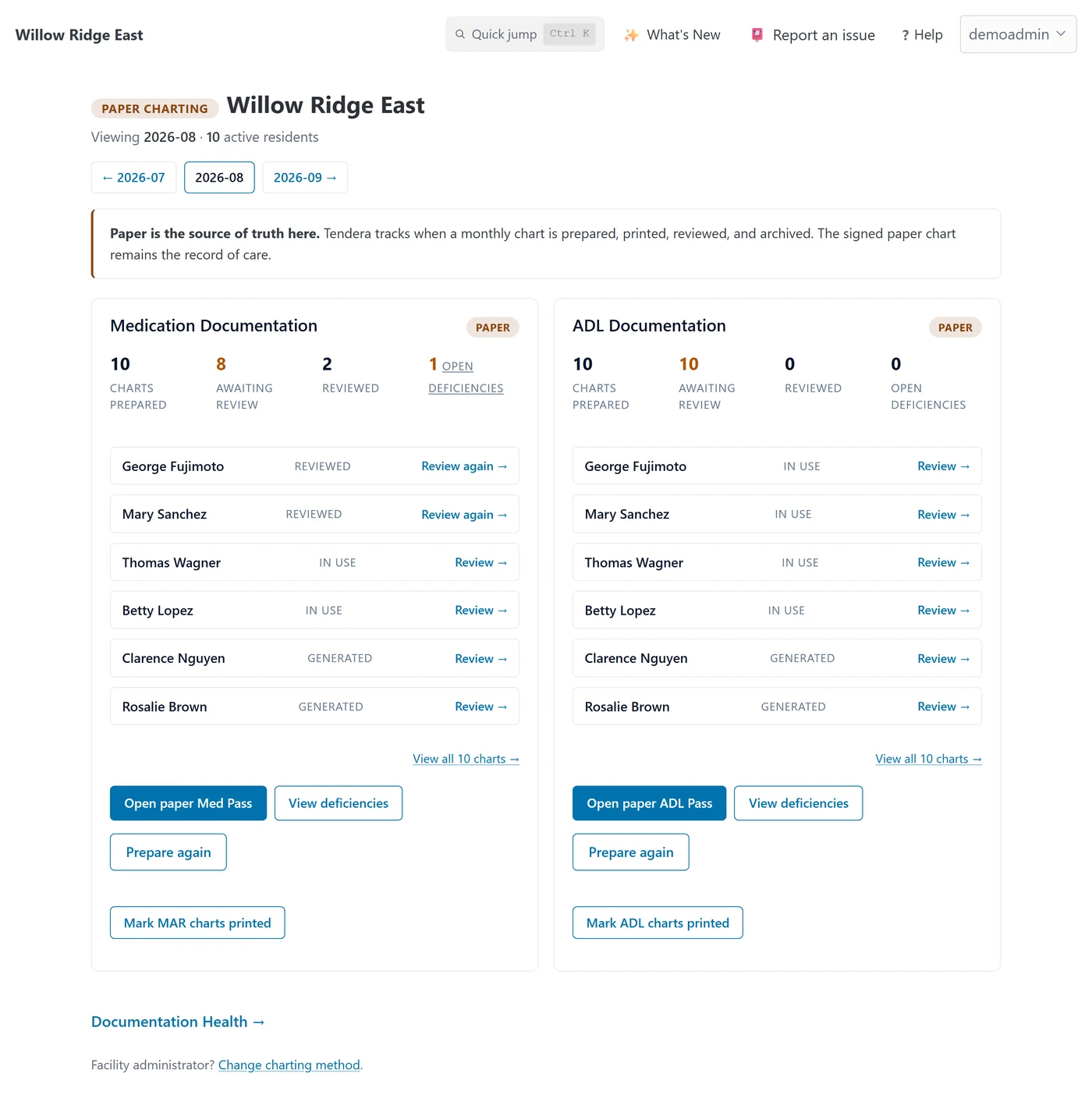 Paper Charting
Paper Charting
Each month, per-resident MAR and ADL packets are prepared from the resident roster, pre-filled with current medications, allergies, and physician. A staff member marks the charts printed when they are, and Tendera records who and when; opening the print view never counts. A manager records the monthly review, and anything found becomes a deficiency assigned to a named person and closed with a note.
Paper Documentation Health shows prepared, awaiting review, reviewed, and open deficiencies per home, and the same signals reach the owner's Portfolio.
What Tendera records: what people marked and reviewed. It does not inspect the physical chart. Moving a workflow to digital later takes effect from the start of a month, and earlier months keep their paper history.
04Owner
Every home you operate, side by side, with a way into each.
Portfolio uses the same numbers each home's manager sees, so nothing on it is a separate calculation.
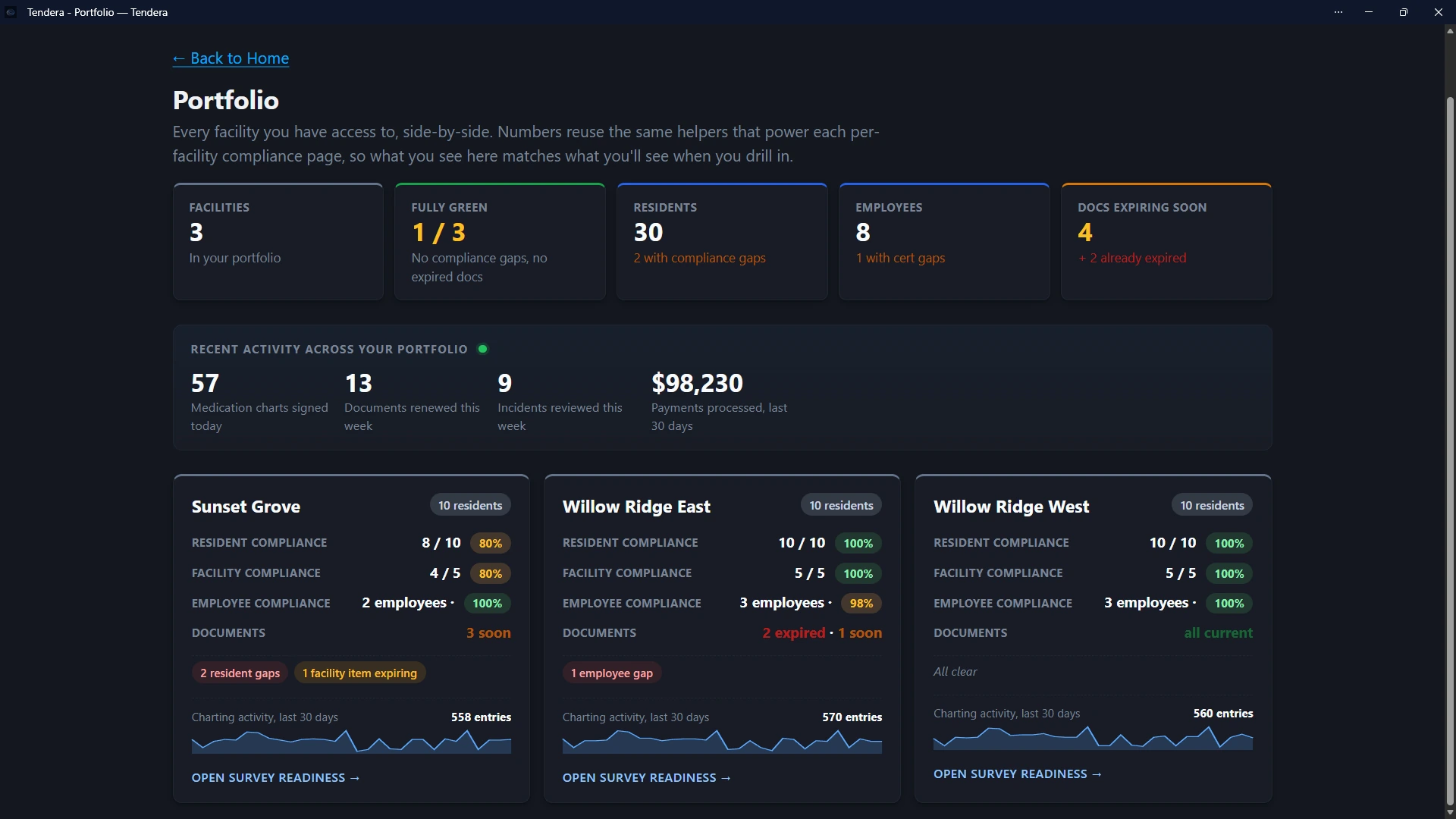 Portfolio
Portfolio
Across the organization: how many homes are fully green, residents with chart gaps, employees with credential gaps, documents expiring or expired, and recent activity such as medication charts signed, documents renewed, incidents reviewed, and payments processed. Each home has a card with its compliance figures, document status, and charting activity over the last 30 days, linking to that home's Compliance hub and Survey Readiness.
Owners see every home in their organization. Managers see the homes they are assigned to. Caregivers see the home they work in. That separation is enforced on the server, not by a setting on the page.
What you end up with: the state of every home without a phone call, and a direct path to the record when something needs a look.
05Supporting operations
The rest of what runs under the same login.
Smaller workflows around the care and compliance work above. Each is real and in use; none needs a second vendor.
See it running
Talk to the person who built it.
Twenty minutes, any workflow above, with demo data. Then decide whether it fits your home.